
No one has messaged me about my listing
Before anything else: how busy Roomie is varies a lot by area. A listing in a big city usually hears something within a few days. Somewhere with fewer Roomie users it can take considerably longer, and that is normal rather than a sign anything is wrong with your listing.
What follows is what we usually suggest. If you have worked through it and it is still silent, the second half covers the things that can stop a listing being seen at all.
What we usually recommend
Lead with your best photo.
The first photo is the cover, and in search results it is effectively the whole listing. A bright, wide shot of the actual room does more than anything else here. Add more of the rest of the place while you are in the edit form, and drag your strongest one to the front.
Fill in every listing detail, including the rent.
Pets, smoking, LGBT+ friendly, furnished, lease length, beds and baths are all things people filter on, and a filtered search only returns listings that gave an answer. A blank one drops you out of those results rather than showing you as a maybe. Rent matters twice over: anyone who sets a minimum price never sees a listing without one.
Write a description that sounds like a place someone lives.
Who else is in the house, what the area is near, what you are hoping for in a roommate. People message listings that read like a person wrote them and skip the ones that read like a form.
Message people who are looking for a roommate.
Do not only wait to be found. Browse the Listings tab for people searching in your area and start the conversation yourself. A lot of what happens on Roomie starts this way round, and it is the fastest thing on this list.
Boost the listing.
A boost lifts your listing above the others in the area for a while, so more of the people searching nearby actually see it. It works best once the photos and details are in good shape, since a boost changes how many people look rather than what they find.
If it is still quiet
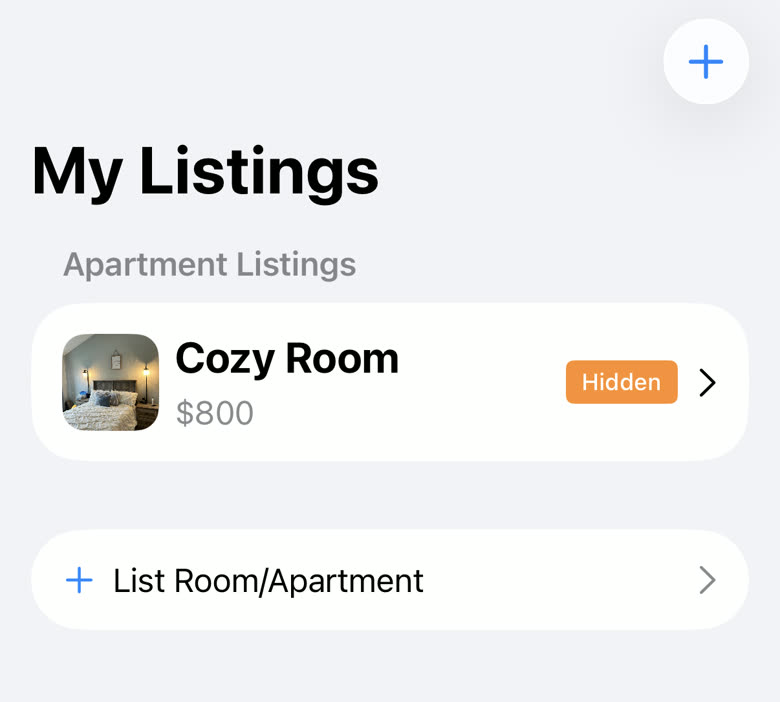
Check the badge on the listing in My Listings.
Active means people can find it. Hidden means it is not in anyone’s search results, and you fix that by opening it and tapping Mark Active. Removed means we took it down, usually for breaking the rules; get in touch if that looks wrong.
Check whether your whole account is hidden.
If every listing you have shows as Hidden at the same time, the listings are fine and the account is hidden. Listing Status on the My Listings screen is the setting that controls it.
Tap Confirm Location on the listing if the button is there.
People can filter their search to confirmed listings only, and an unconfirmed listing is invisible to anyone who does. You have to be at the place, within about half a mile of the address, for it to work.
Check the address is actually right.
Roomie shows your listing to people searching near the address you entered, not near you. A typo in the street or the city puts it somewhere nobody is looking. Tap Preview to see exactly what everyone else sees.
Rule out messages you have not seen.
Open the Messages tab and look. If there is nothing there, turn notifications on under My Profile so the next one reaches you.
Roomie Pro adds a Stats button to your listing showing search views and views. If search views are high but views are low, the cover photo or the rent is putting people off. If search views are low, fewer people are reaching it at all, which is what a boost is for.
Your own listing does not appear in your own feed, so not seeing it there is normal and not a sign that anything is wrong. Preview is the way to check how it looks.
Anyone can message you no matter what plan they are on, so a quiet inbox is never because the other person ran out of messages.
Still stuck? Get in touch and we'll help.